
Short answer: an active OT scanner can only identify devices it can reach. When a machine sits behind an industrial router doing NAT, the plant network sees a single address, the router's, and nothing behind it. When industrial VLANs are separated by firewalls, a scanner in one VLAN sees only that VLAN. This is a property of the network, not of any particular tool. The fix is to change where the scan runs from, or what the network lets it reach: scan from inside the cell, give the scanner a presence in each VLAN, open narrow firewall rules, use 1:1 NAT, or read the router's own tables.
We often hear about this. One engineer put it simply: "the scanner finds the router, and nothing else."
Why does a scanner on the IT network see only the router?
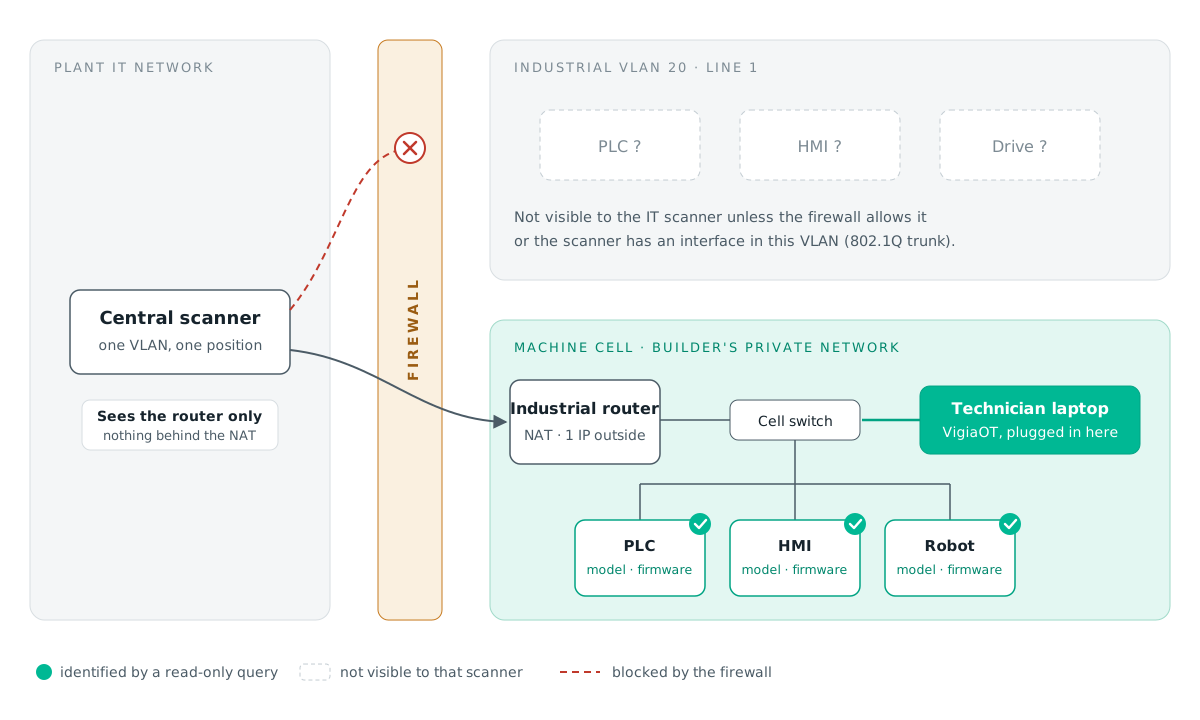
Machine builders usually deliver a machine with its own private network: the PLC, HMI, drives and robot on addresses such as 192.168.0.x, often identical from one machine to the next. To connect the machine to the plant, they add an industrial router that translates those private addresses to a single address on the plant network (NAT).
From the plant side, that router is the only device that exists. A scan of the plant VLAN finds it, maybe identifies it, and stops there. Requests to the PLC behind it have no address to go to. The same machine model installed ten times in a hall can look like ten routers and nothing else.
Why does a central scanner miss other industrial VLANs?
Good segmentation puts each line or area in its own VLAN, with a firewall between them and between OT and IT. A plant with five industrial VLANs separated by a firewall has, by design, five networks that cannot see each other.
A scanner, or a passive sensor, placed in one of them inventories that one. To cover the other four, it must either be present in each VLAN or be allowed through the firewall. Neither happens by default, and neither should.
Five ways to inventory devices behind NAT and firewalls
- Scan from inside the cell. Connect a laptop to the machine's own switch, behind the router. Every device in the cell is then directly reachable and can be identified down to model and firmware. This is the approach we built VigiaOT Solo around: the laptop visits each cell in turn and leaves nothing installed. It also solves the "same private addresses in every machine" problem, because each cell is scanned and catalogued separately.
- Give the scanner one interface per VLAN. A fixed scanner can be connected to a switch port configured as an 802.1Q trunk, with one virtual interface in each industrial VLAN. It then scans each VLAN from inside, without routing through the firewall. This needs network team approval and careful documentation, because the scanner becomes a device present in every VLAN.
- Open a narrow, read-only firewall rule. Instead of a trunk, allow only the scanner's address to reach the identification ports in each VLAN: for example TCP 102 (S7), 502 (Modbus), 44818 (EtherNet/IP), 4840 (OPC UA), 48898 (ADS) and UDP 161 (SNMP), 47808 (BACnet), 9600 (FINS). Keep the rule disabled outside planned scan windows if your policy requires it.
- Use 1:1 NAT on the machine router. Many industrial routers support mapping each internal device to its own address on the plant side (1:1 NAT or netmap). Once mapped, those devices can be scanned from outside like any other. Check with the machine builder before changing their router.
- Ask the router what is behind it. Even when the devices themselves cannot be reached, the router knows them. Its ARP table, readable over SNMP on many models, lists the MAC and IP addresses of the devices on its internal side. The MAC address alone gives the manufacturer of each device. It is not a full inventory (no model, no firmware), but it tells you what to expect when someone visits the cell.
Which option should you choose?
| Situation | Practical choice |
|---|---|
| Few cells, technicians already visit them | Scan from inside each cell with a laptop |
| Many VLANs, a fixed scanner wanted, network team involved | 802.1Q trunk or narrow firewall rules |
| Machines behind NAT routers you control | 1:1 NAT, then scan from the plant network |
| Machines behind NAT routers you do not control | Laptop in the cell, plus the router's ARP table as a first picture |
| Fieldbus devices (Profibus, Modbus RTU) | Through the gateway that exposes them, or recorded by hand |
In most plants the answer is a mix: a laptop for the cells behind NAT and for isolated machines, and a fixed position or firewall rules for the VLANs that are already reachable.
What this means for NIS2 and IEC 62443 inventories
An asset inventory that lists a router where there are really a PLC, an HMI and a robot is incomplete, and the missing devices are often the ones that matter most. When planning an inventory, map the network first: which cells are behind NAT, which VLANs exist, and which of them a scanner can reach. Then pick the method for each. The coverage report of the inventory should say which areas were scanned and how, so an auditor can see what is and is not included.
For the full method, from discovery to vulnerability checks against NVD, EUVD and CISA KEV, see How to Discover Industrial PLCs and Assess OT Vulnerabilities Without Permanent Sensors.