
Short answer: in a segmented plant, the most reliable way to inventory PLCs without installing permanent sensors is to take a laptop into each isolated cell and ask every device who it is, using the same read-only identification requests the vendors' own engineering tools use. That gives you vendor, model, order number and firmware for each device. Those exact versions are then checked against NVD, the European Vulnerability Database (EUVD) and CISA's Known Exploited Vulnerabilities (KEV) catalog, so the team sees which devices carry a vulnerability that is being exploited right now.
This guide explains how that works, where it stops working, and what it looks like in practice.
Why is it so hard to inventory devices on an industrial network?
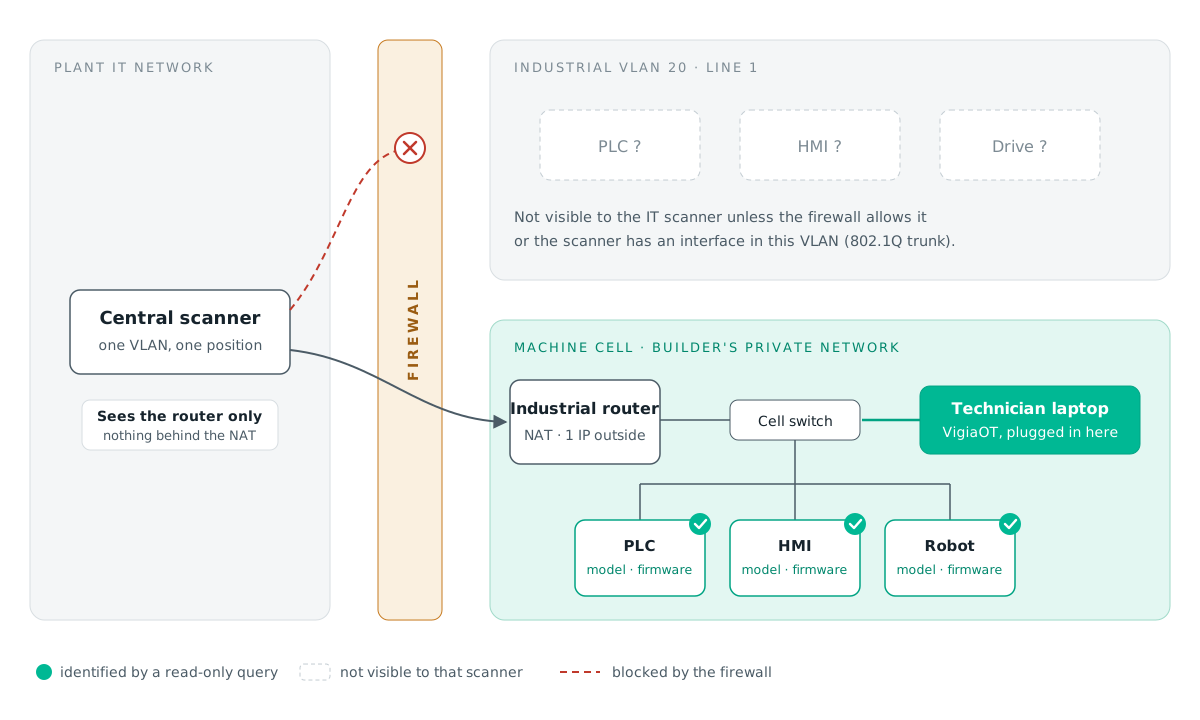
Most plants do not have one flat OT network. Each machine or cell usually sits on its own isolated network, often delivered that way by the machine builder, and is connected to the rest of the plant through a firewall, a VLAN boundary or an industrial router doing NAT. Many cells are not connected at all.
That design is good for safety, but it means no single point in the network can see every device. It is also why so many inventories are still spreadsheets typed by hand from cabinet labels, and why they go out of date the first time a CPU is replaced or a firmware is updated.
Regulation has made the gap visible. NIS2 Implementing Regulation 2024/2690 asks in-scope entities to keep an inventory of their assets, and IEC 62443-3-3 (SR 7.8) asks for a control system component inventory. An auditor will ask for that list, and a security team cannot judge exposure without it.
Active vs passive discovery: what is the difference?
There are two ways to learn what is on an OT network.
| Passive discovery | Active discovery | |
|---|---|---|
| How it works | Listens to traffic copied from a switch (SPAN/TAP) and infers devices from what they say | Sends a short identification request to each device and reads its answer |
| What it needs | A sensor or appliance installed at each point you want to watch | A laptop or scanner that can reach the devices |
| What it sees | Only devices that talk across the monitored link, while they talk | Every device that answers in the range you scan |
| Model and firmware | Often incomplete: depends on the traffic captured | Usually complete: the device reports it directly |
| Isolated cells | Needs a sensor in each cell | One laptop visits each cell in turn |
| Risk to production | None on the device itself | Low with read-only, rate-limited requests; must be controlled |
Passive monitoring is the right tool for detecting unusual traffic over time. For building an accurate inventory of what is installed, down to firmware, active and read-only identification is faster and more complete, and it does not require hardware in every cell.
How do you identify the vendor, model and firmware of a PLC?
Each industrial protocol has a standard way to ask a device to identify itself. A well-behaved scanner uses those requests and nothing else:
- Siemens S7 (port 102): reads the System Status Lists for module and component identification (SZL 0x0011 and 0x001C). It returns the order number, firmware, module name and serial number. This works even on S7-1200 and S7-1500 CPUs with PUT/GET disabled.
- EtherNet/IP (port 44818): the ODVA List Identity request returns vendor, device type, product code, revision, serial number and product name, without opening a CIP session.
- Modbus TCP (port 502): the Read Device Identification function (0x2B / 0x0E). On Schneider Modicon controllers, a read-only UMAS identification request also returns the CPU name behind the Ethernet module.
- Omron FINS (port 9600): one Controller Data Read.
- Beckhoff ADS, BACnet/IP (Who-Is), OPC UA (endpoint information), SNMP (sysDescr), MQTT and mDNS: each answers with its own identity fields.
- Any other device: the MAC address registry still tells you the manufacturer of its network interface.
None of these requests writes to the device, changes its operating mode or holds a connection open. Scans should also be paced, use short timeouts and respect an exclusion list for fragile devices.
How do you check devices against NVD, EUVD and CISA KEV?
Knowing that a device is "a Siemens PLC" is not enough to judge risk. The model and firmware are what make a vulnerability check meaningful.
- Build a precise product query. The identification above becomes a product name the databases recognise, for example "Siemens SIMATIC S7-1200", rather than a raw order number that keyword searches miss.
- Look it up in NVD to get the CVEs published for that product family.
- Compare the device's firmware with each CVE's affected version ranges (the CPE data NVD publishes). A CVE fixed in a firmware older than the one installed should not be reported as open. When the version cannot be read or compared, the finding should be kept, not silently dropped.
- Enrich with EUVD, ENISA's European Vulnerability Database, which is the EU's reference database under NIS2 and adds EU-specific identifiers and EPSS exploitation scores.
- Flag anything in CISA KEV. A CVE on the Known Exploited Vulnerabilities list is being used by attackers today. In practice this is the shortest path to a prioritised list: a dozen devices to act on first, instead of hundreds of theoretical findings.
Each finding then needs a human decision (mitigate, accept the risk, mark as false positive), and that decision should be revisited automatically when circumstances change, for example when an accepted CVE is added to KEV.
What are the limits of active discovery in OT networks?
Active discovery can only identify what it can reach, and industrial networks are built to limit reach:
- Machines behind an industrial router with NAT. From the plant side only the router's address exists, so any scanner outside the cell sees the router and nothing behind it.
- Industrial VLANs separated by firewalls. A central scanner sees only the VLANs it has a presence in or is allowed through.
- Serial fieldbuses (Profibus DP, Modbus RTU, DF1) are not on IP at all and are only visible through a gateway or converter.
- A scan is a point-in-time picture. Cells that change need repeat visits to keep the inventory current.
This is exactly why the laptop goes to the cell rather than scanning from a distance, and why passive listening at the IT/OT boundary remains a useful complement over time. Even read-only requests should be introduced carefully on a running line: start with a small range you know, during a planned window. We cover the NAT and VLAN cases, and five ways around them, in Why Your OT Scanner Only Sees the Router.
A practical example with VigiaOT
VigiaOT was built around this approach. The technician installs VigiaOT on their own laptop (Windows or macOS, no admin rights, no capture driver), connects to the cell's switch, and scans the cell's address range.
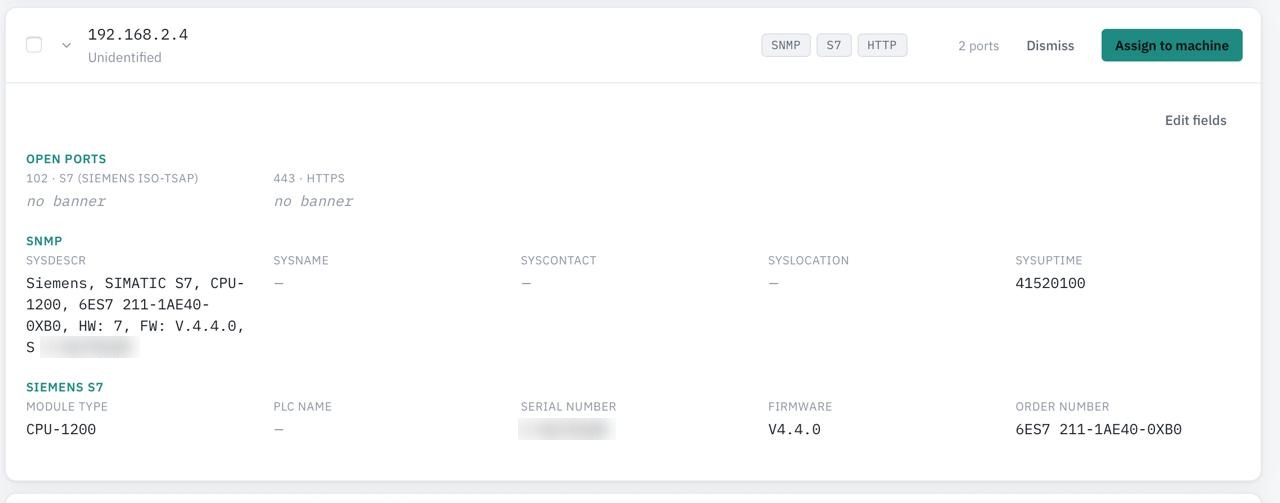
In the scan above, a device at 192.168.2.4 answered on S7 (port 102) and SNMP. The S7 identification returned the module type (CPU-1200), the order number 6ES7 211-1AE40-0XB0, firmware V4.4.0 and the serial number, without writing anything to the PLC. The technician reviews what was found, confirms it and assigns it to a machine in the inventory.
With Solo Analytics, the confirmed inventory is checked against NVD, EUVD and CISA KEV once the laptop is back on a network with internet access. Each finding is compared against the device's own firmware version, and KEV entries are flagged first.
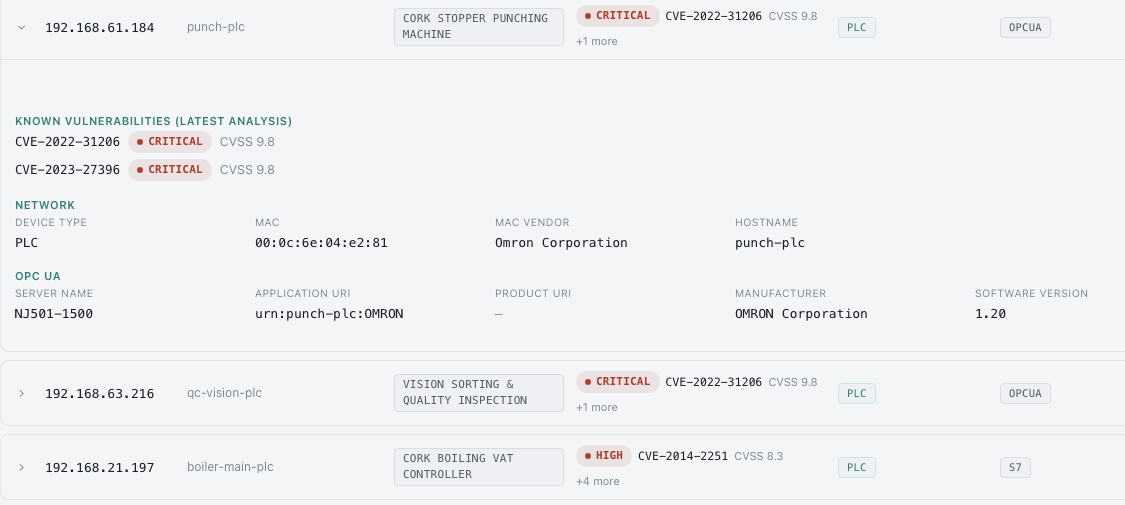
The result is an Excel inventory laid out for an asset-inventory audit (with a mapping to NIS2 Implementing Regulation 2024/2690, ISO/IEC 27001 A.5.9 and IEC 62443-3-3 SR 7.8), the list of findings with their review decisions, and a one-page summary for management. For a whole plant, VigiaOT Site collects every technician's scans on one on-site appliance.
The free version inventories up to 5 devices with no time limit. Try it on one of your cells.